Currency Strength Meter
shubhlaxmiFinance
3.55.00 Reviews
- Version
- 1.4.0
- Installs
- 10.00K
- Age Rating
- Everyone
Screenshots
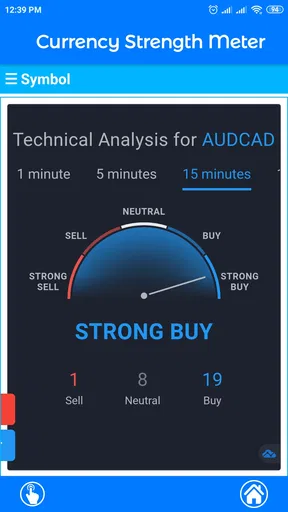
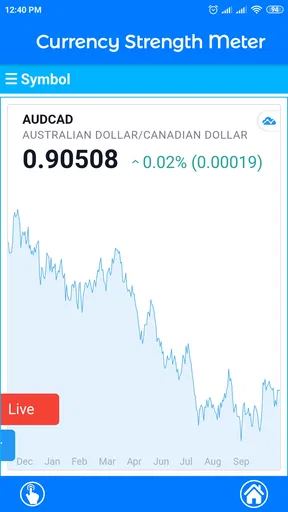
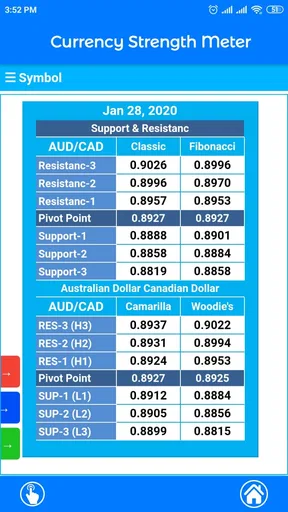
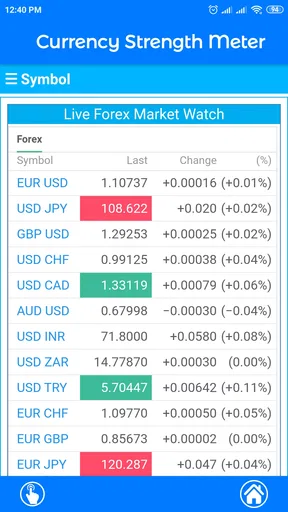
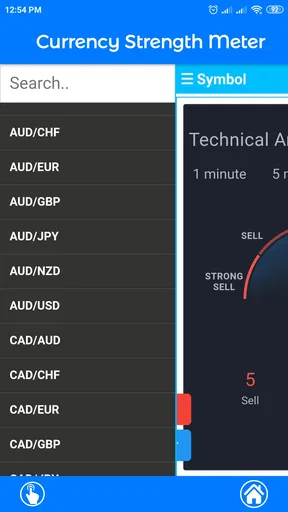
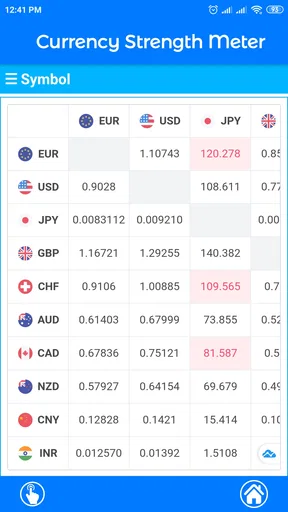
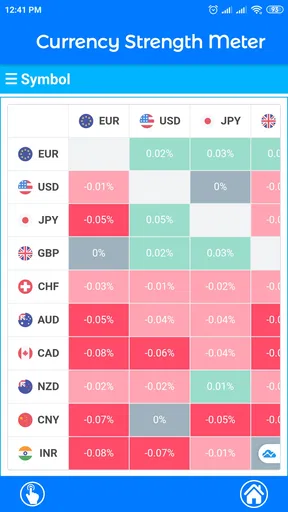
Our Review of Currency Strength Meter
 Analysis by Appyee
When I look at a finance app, I want to know what decision it can improve before I spend time learning it. Currency Strength Meter takes a narrow approach: it helps me compare the relative strength of currency pairs across different timeframes. That focus makes it easier to judge than a crowded trading platform, but it also means the app is useful only if this particular kind of market view fits the way you work.
After using it as a quick market-checking tool, I see it as a companion rather than a complete trading workspace. It is free to install, aimed at everyone from a content-rating perspective, and runs on Android seven or later. The developer is shubhlaxmi, and the current release is version 1.4.0. Those details matter because the app is accessible to a broad audience, but accessibility should not be confused with simplicity of trading itself: interpreting currency strength still requires patience and basic knowledge of foreign exchange.
How to decide whether this focused finance app fits
I’d use this section to judge whether a dedicated currency-strength view would answer a question I regularly have, rather than adding another screen out of curiosity. The key test is whether comparing timeframes changes what I choose to investigate next; if it does, the app may earn a small, steady role in my routine.
Start with the question you need answered
The most useful question here is not “Should I buy or sell?” It is closer to “Which currency appears stronger or weaker over the period I am examining?” That distinction is important. A strength meter can help narrow attention, but it does not replace a trading plan, risk control, economic research, or a broker’s execution tools.
I found the app most sensible when I wanted a fast comparison before opening a chart elsewhere. Instead of beginning with a long watchlist, I could use the strength view to form a shortlist of pairs worth investigating. This is a practical workflow for someone who already has another app or website for detailed charts and orders. It is less suitable for a person expecting one application to provide research, alerts, portfolio management, and trading in one place.
The timeframe element is the feature that gives the app its real decision value. A currency may look strong over one period and less convincing over another. Checking more than one timeframe can prevent a rushed conclusion based on a single snapshot. I would treat agreement across timeframes as a reason to investigate further, not as proof that a trade is safe. When the readings disagree, that disagreement is useful too: it tells me that the market picture may be mixed rather than giving me a false sense of certainty.
What I check before relying on the readings
I would not use a strength ranking in isolation. My routine would be to inspect the broad comparison first, identify a possible pair, and then move to a proper chart for trend structure, support and resistance, volatility, and timing. If a major economic announcement is approaching, I would be especially careful. A clean-looking strength relationship can change quickly, and a meter cannot turn uncertainty into a guaranteed signal.
Another small but important habit is to avoid treating the strongest currency and weakest currency as an automatic trade. Relative strength is context-dependent. A currency can be strong because of a temporary move, while a pair may already have traveled too far for the entry I want. The app is better at helping me ask a sharper next question than at answering the entire trading question for me.
This makes it a reasonable learning aid for someone who is trying to understand how currencies relate to each other. It gives the user a visual starting point for comparison, but the user still needs to learn what the comparison means. Beginners should spend time understanding pairs, base and quote currencies, and the difference between observation and a trading signal before risking money.
Where it is strongest in everyday use
The strongest use case is a short pre-market routine. Imagine checking the market before work, with only a few minutes available. I would open the meter, compare several timeframes, note which currencies deserve attention, and then save the deeper chart work for later. That is more efficient than opening every pair at random, especially when I am trying to keep my watchlist under control.
It can also help with review after a trading session. Rather than judging a pair only by the result of one position, I can look back at whether the broader currency relationship supported the idea. This does not prove that the trade was correct, but it can reveal whether I ignored a conflicting timeframe or entered when the relative picture was unclear.
A less obvious benefit is that it encourages comparison instead of fixation. Many new traders stare at one familiar pair and interpret every small movement as meaningful. A strength view can shift attention toward relationships across currencies. That broader perspective is valuable, provided I remember that a ranking is a starting point and not a complete market explanation.
Where this app wins against broader trading tools
Compared with a full trading platform, the appeal is its narrow purpose. A broker app is designed around accounts, orders, balances, and execution. A charting suite usually offers many indicators and drawing tools. Currency Strength Meter belongs to a different category: it is a quick comparison instrument. If I already have my preferred broker and charting setup, adding a focused utility can be less distracting than learning another all-in-one platform.
That focus also makes it easier to build a repeatable routine. I can decide in advance which timeframes I will inspect and how I will confirm a potential idea. In my experience, a smaller tool can be useful when it prevents unnecessary browsing. The app does not need to become the center of my workflow to earn a place in it.
The published average is 3.5 from roughly 131 ratings, with five written reviews shown in the store. I read that as a sign to keep expectations measured rather than assuming universal polish. The app has passed the basic threshold for interest, with over ten thousand installs, but that audience size does not tell me whether it will match every device, trading style, or expectation. I would install it because the concept is relevant to me, not because the store numbers promise a finished replacement for every finance tool.
Where alternatives may fit better
A broker’s mobile application is the better choice when my priority is placing and managing trades. A charting-focused app is better when I need detailed technical analysis, custom layouts, drawing tools, or a large indicator library. A financial news app is more appropriate when the main question is why a currency is moving. Currency Strength Meter can sit before all of those steps, but it cannot replace them.
This distinction is especially important for experienced traders who already have a carefully built workflow. If I need synchronized charts, advanced alerts, extensive historical analysis, or direct execution, switching to a small strength utility may add another screen without solving my main problem. The right alternative depends on the missing task: execution, analysis, research, or record keeping.
I would also skip this app if I am looking for a simple investment app for stocks, funds, or long-term savings. Its purpose is tied to currency-pair comparison, so someone outside foreign exchange may find the central idea irrelevant. Likewise, a complete beginner who wants a guided course may learn more from an educational resource first, then return to this kind of tool once the terminology has meaning.
Important limitations in the way I would use it
The biggest limitation is interpretive, not necessarily technical. “Strength” sounds definitive, but it is a relative measurement that depends on the timeframe and the comparison being made. I would avoid turning one strong reading into a prediction. The app can help me notice momentum or imbalance, yet it does not remove the need to understand market conditions.
The second limitation is workflow fragmentation. If I use the meter, a charting app, a news source, and a broker separately, I must carry the context between them. That is manageable for a quick check, but it becomes tiring if I repeat the process many times each day. A broader platform may be worth choosing if convenience matters more than having a specialized view.
There is also a practical learning cost. The interface may be simple in concept, but a new user still has to decide which timeframe matters, how to compare conflicting readings, and what confirmation is enough. I would not hand the app to a friend and tell them that the screen alone explains the market. I would show them how I use it as a filter, then insist that they verify every idea independently.
Free access, optional spending, and the cost of switching
The app is free to download, while optional in-app purchases range from $1.99 to $15.99 per item. That gives me a low-risk way to test the basic experience before deciding whether any paid element is worthwhile. I would spend only after using the free version in my normal routine and identifying a specific limitation that the purchase addresses. Paying simply because a finance app feels useful would not be enough reason.
The cost of switching is mostly time and habit. If I already use a broker or charting service, adding this app means learning where it fits, remembering to check it, and keeping its readings aligned with the rest of my process. That cost is small for a casual comparison, but it can become noticeable when I want a single, unified workspace. Before switching from an existing tool, I would test whether the strength view actually changes my shortlist or improves my preparation.
On the other hand, moving to this app from a cluttered routine may reduce friction. If I currently open several pairs without a clear order, a focused meter can provide a more disciplined first step. The trade-off is straightforward: I gain a specialized comparison screen, but I still need another place for detailed confirmation and execution.
Three practical habits that make the tool more useful
First, I would record the timeframe agreement rather than only the top currency. For example, if the same relationship appears across short, medium, and longer views, I would mark it for chart review. If the views conflict, I would label the idea as uncertain instead of forcing a trade. This turns the app from a glance-based signal generator into part of a repeatable decision process.
Second, I would compare the meter with what I can actually trade. The most interesting currency relationship is not automatically the most practical one if the pair has poor timing, excessive movement, or does not fit my plan. The app helps with selection, but my broker, risk rules, and schedule still decide whether an opportunity is usable.
Third, I would use it as a review tool for missed opportunities and false starts. After a week of notes, I could see whether the readings helped me avoid random pair selection or whether they merely encouraged more screen time. That personal test is more valuable than assuming the app will improve results by itself. A utility earns its place when it improves a process I can explain, not when it produces exciting-looking numbers.
My recommendation for different types of users
I recommend trying it if you already follow foreign exchange and want a compact way to compare currency-pair strength before doing deeper analysis. It is particularly suitable for a trader who has a separate charting or brokerage solution and wants a first-pass filter. The free entry point makes that trial easy, and the Everyone age rating keeps the app broadly accessible, although responsible trading still requires adult judgment and financial education.
I would be more cautious recommending it to a complete beginner. The narrow view may look easier than a full platform, but it can encourage overconfidence if the user mistakes relative strength for a direct instruction. Beginners should first learn the basics and use the meter for observation or paper practice rather than treating it as a shortcut to live decisions.
I would also point experienced users toward their existing platform when they need execution, news, advanced charting, or a consolidated portfolio. In those cases, this app may be a useful extra screen, but it is unlikely to be the best single destination. Its value depends on whether the focused comparison saves time or adds another disconnected step.
My final view
Currency Strength Meter is a specialized finance app with a clear role. I like it best as the opening stage of a foreign-exchange workflow: compare currencies, inspect more than one timeframe, choose a pair for further study, and confirm the idea elsewhere. That is a modest role, but a genuinely useful one when I want structure instead of randomly scanning charts.
Its average of 3.5 suggests that I should approach it with realistic expectations, while its free availability makes testing straightforward. The developer, shubhlaxmi, has kept the concept focused enough that I can understand the intended use quickly. Still, the app does not eliminate the hard parts of trading, and optional purchases should be judged by whether they solve a real workflow problem.
My clear recommendation is to try it as a free companion, not as a standalone trading system. If comparing currency strength across timeframes improves the way you build a watchlist, it can become a handy part of your routine. If you want orders, research, deep charts, or guided education in the same place, choose a broader alternative and use this kind of meter only if its focused perspective adds something your main platform lacks.
Verdict
Strengths of Currency Strength Meter
- Quickly compares the relative strength of major currencies
- Useful for spotting potential trends across multiple forex pairs
- Clean layout makes strength rankings easy to scan
- Can support both short-term and longer-term market analysis
- Helps traders avoid focusing on a single currency pair only
Limitations of Currency Strength Meter
- Currency strength readings can change rapidly during volatile markets
- Does not replace fundamental or technical analysis
- Some features may require a premium subscription
- Limited value for users who do not trade forex
- Signals may be difficult for beginners to interpret correctly
Similar Picks in This Category
View All
Google Wallet
Google LLC4.3

Airtel: Recharge, Bank & Loans
Airtel4.0

PayPal - Pay, Send, Save
PayPal Mobile4.2

DANA Indonesia Digital Wallet
PT Espay Debit Indonesia Koe4.5

Binance: Buy Bitcoin & Crypto
Binance Inc.4.8

Cash App
Block, Inc.4.7
Frequently Asked Questions
What is Currency Strength Meter and what does it do?
Currency Strength Meter is a financial analysis app designed to compare the relative strength of major currencies in the foreign exchange market. It typically presents strength values, rankings, charts, or visual indicators for currencies such as the US dollar, euro, British pound, and Japanese yen. The information can help traders identify stronger and weaker currencies before researching potential currency pairs, but it should be treated as market analysis rather than a guaranteed trading signal.
How can I use Currency Strength Meter to analyze forex markets?
After opening the app, review the currency rankings or strength dashboard and compare currencies over the selected time period. A currency showing strong momentum may be worth comparing with a weaker currency to identify pairs for further research. However, strength readings can change quickly and may be affected by the chosen timeframe, market news, spreads, and calculation method. Always confirm the information with price charts, technical analysis, and your own trading plan.
Is Currency Strength Meter suitable for beginners?
The app can be useful for beginners because it provides a simplified overview of relative currency performance instead of requiring users to inspect every currency pair individually. Nevertheless, new traders should understand basic forex concepts, including currency pairs, pips, leverage, volatility, and risk management, before acting on the information. The app is best used as an educational and research tool, not as an automatic system that tells beginners exactly when to buy or sell.
Does Currency Strength Meter provide real-time and accurate data?
The usefulness of Currency Strength Meter depends on the data provider, update frequency, selected timeframe, and the formula used to calculate currency strength. Some versions may display delayed information, while others may require an internet connection or offer real-time updates through a premium plan. Before relying on the readings, check the app’s data details and compare its results with a trusted broker or market platform. No strength meter can guarantee completely accurate or profitable predictions.
Is Currency Strength Meter free, and are there any limitations?
Availability and pricing may vary depending on the version of Currency Strength Meter and the platform where it is downloaded. A free version may include the main strength dashboard but could contain advertisements, limited timeframes, fewer indicators, or restricted historical data. Premium features may be offered through subscriptions or in-app purchases. Review the store listing, permissions, privacy information, and subscription terms carefully before downloading or starting a trial, especially if you plan to use the app regularly.
